How to fork a nodejs stream into many streams
Edit 7 Jan 2020
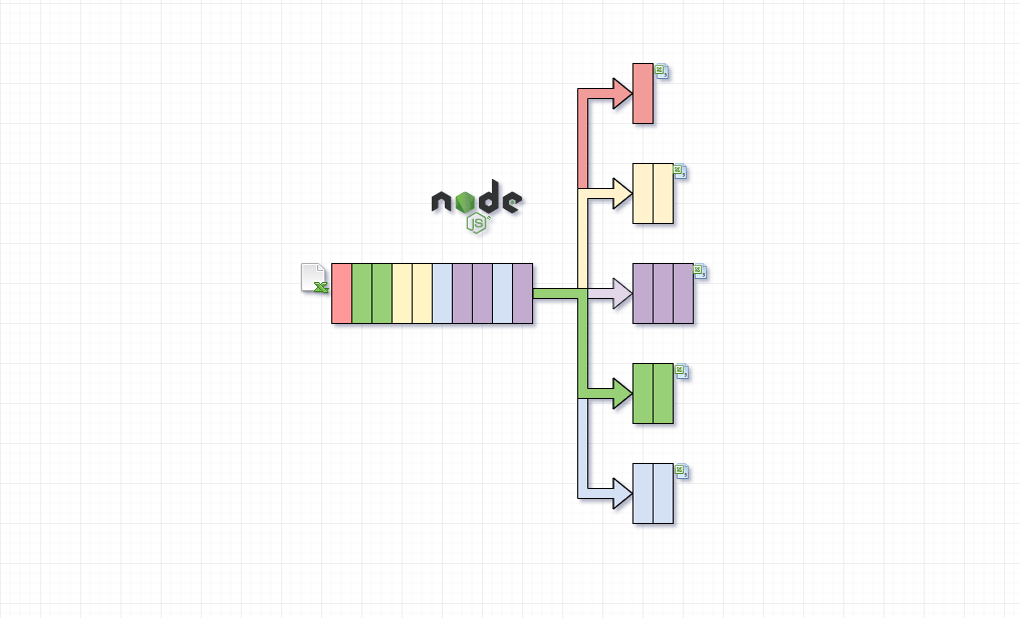
After posting the article on reddit, the user chocoreader correctly notified that it's not a fork of the stream. It's a classical enterprise pattern Content-Based Router which routes each message to the correct recipient based on message content.
Intro
In the following tutorial, we will process a relatively big CSV file using nodejs streams API and the fast-csv module. The CSV file contains economic data for all the countries on the globe.
Our goal is to create a CSV file containing the data for each country separately. The result will be stored in a separate folder called
countries.
Code solution
'use strict';

const fs = require('fs');
const csv = require('fast-csv');
const { Transform, PassThrough, pipeline } = require('stream');

const readable = fs.createReadStream('1500000-sales-records.csv');

// Create a map of streams for each country, at first empty
const streams = {};

const splitStream = new Transform({
  objectMode: true,
  transform(object, _enc, next) {
    // if there is no stream created for the country, then we create one
    // our csv contains the Country header which is used as discriminator map here
    if (!streams.hasOwnProperty(object.Country)) {
      const through = new PassThrough({ objectMode: true });
      streams[object.Country] = through; // attaching the passthrough to the streams object

      pipeline(
        through,
        csv.format(),
        fs.createWriteStream(
          'countries/' + object.Country.toLowerCase() + '.csv'
        )
      );
    }

    streams[object.Country].push(object); // pushing the csv line to filtered stream
    next(null);
  },
  flush(next) {
    // Once the stream has finished processing we need to notify all active
    // streams that they are finished by sending null
    Object.keys(streams).forEach(country => {
      streams[country].push(null);
    });

    next(null);
  }
});

pipeline(readable, csv.parse({ headers: true }), splitStream, err => {
  if (err) console.error(err);

  console.log('everything went very fine');
});
Conclusion
The idea is straight forward we create the streamflow the moment we find data. After we push data to the subsequent stream, the memory footprint is linear.
A critical moment is to use the flush() function to send null to all the opened streams. This will finish the process and close all the opened streams.